CPU part 2 - ALU
Now the general design of the CPU is clear, it is time to write the first Verilog module: the ALU. It is the simplest component of the CPU to write, and it shows how in the end all complex tasks we do with computers come down to simple arithmetic operations (and moving data around, but that is not the responsibility of the ALU).
As I am going through the core components of the CPU, I will write a short blog post for each one where I explain a bit what it does, design choices I made, and if it makes sense some simulation output to help visualize its behavior.
What the ALU does
The ALU (Arithmetic Logic Unit) is the part of the CPU that does the actual calculations. It lives in the EX stage, and takes two 32-bit inputs a and b plus a 4-bit operation code op, and outputs the 32-bit result y. There is no clock involved: it is purely combinational logic, so the result changes as soon as the inputs change. Although, technically that is incorrect: the ALU itself contains a large amount logic gates to perform these operations on 32 bit inputs (just try to count the amount of gates in a 32 bit full adder and you’ll understand), all being gated by the opcode. This large amount of logic therefore introduces a lot of propagation delays, which is the main reason why you want to isolate the ALU as much as possible within a single pipeline stage. That means that at the start of the EX stage the inputs should be stable, and by the time the next cycle starts the result should be stable at the output.
These are the 13 operations it supports (the full table is on the instruction set page):
| Group | Operations |
|---|---|
| Logic | or, and, xor, not |
| Arithmetic | add, sub |
| Shifts | shiftl, shiftr (logical), shiftrs (arithmetic) |
| Compares | slt (signed), sltu (unsigned) |
| Constants | load, loadhi |
A few of these might need a bit of explanation.
Compares instead of flags. Many CPUs (like x86) have a status register with flags like “zero” or “carry”, which are set by every calculation and then used by a branch afterward. Like MIPS and RISC-V, B32P4 does not have this. A branch instruction compares two registers by itself, and when you need the result of a compare as a value, you use slt (“set if less than”), which gives 1 or 0. I actually chose to add the slt and sltu operations somewhere around the design of B32P2 because they were used a lot in the C compiler for MIPS that I was using at the time and adapted to output machine code for my CPU. You definitely can do without these two (as I did before B32P2), but they allow you to write shorter code in many cases.
Signed and unsigned. For most operations, it does not matter whether you see the bits as a signed or unsigned number. Thanks to two’s complement (I am not going to explain that here, it is explained online a lot and in every course already), an add or sub gives exactly the same bits either way. Only two kinds of operations need to know the difference: the compares, and the right shift. That is why there are both slt and sltu, and both shiftr and shiftrs. The logical shiftr shifts in zeros from the left, while the arithmetic shiftrs copies the sign bit, so that a negative number stays negative (-16 >> 2 is -4). We will see this again in other operations like multiply.
Loading constants. An instruction is 32 bits wide, so a 32-bit constant does not fit in it, because then we have no way to tell the CPU what to do with that number (and whether it is an instruction or a number). Instead, the instructions with a constant have a 16-bit field, which goes into the ALU through the b input. load simply outputs b, and loadhi puts the lower 16 bits of b in the upper half of the result, keeping the lower half of a. Together they can load any 32-bit value into a register in two instructions, which the assembler does for you with the load32 pseudo-instruction. Where a and b come from does not matter in the end for the ALU, as it just reads the arguments and produces the result. It is the control logic around the ALU that makes these decisions.
Multiply and divide are not in here. A multiply needs two pipeline stages and a divide takes many cycles, so they do not fit in a single-cycle ALU, and get their own modules next to it. More on those in later posts.
The Verilog
The module itself is very short. I usually do not want to paste a lot of code in a blog or documentation, but in this case it is short enough to show. This also highlights how powerful a HDL language like Verilog is compared to designing logic with bare logic gates. Doing this conversion is up to the synthesizer, which will be different from actual CPUs because FPGAs work internally with lookup tables instead of direct transistor logic.
module cpu_alu (
    input  wire [3:0]  op,
    input  wire [31:0] a,
    input  wire [31:0] b,
    output reg  [31:0] y
);

always @(*) begin
    case (op)
        4'b0000: y = a | b;                             // or
        4'b0001: y = a & b;                             // and
        4'b0010: y = a ^ b;                             // xor
        4'b0011: y = a + b;                             // add
        4'b0100: y = a - b;                             // sub
        4'b0101: y = a << b[4:0];                       // shiftl
        4'b0110: y = a >> b[4:0];                       // shiftr
        4'b0111: y = ~a;                                // not
        4'b1010: y = {31'b0, $signed(a) < $signed(b)};  // slt
        4'b1011: y = {31'b0, a < b};                    // sltu
        4'b1100: y = b;                                 // load
        4'b1101: y = {b[15:0], a[15:0]};                // loadhi
        4'b1110: y = $signed(a) >>> b[4:0];             // shiftrs
        default: y = 32'bx;                             // reserved/unused
    endcase
end

endmodule
There are a few design choices in here that are worth mentioning:
- A plain case statement. You can actually spend a lot of effort trying to write down the logic more efficiently for the implementation on the FPGA. However, these types of optimizations make the code more unreadable and complex, while in the end you most likely are hurting performance instead of improving because the synthesizer (the software that converts Verilog into FPGA configuration) will do a better job at these optimizations. Instead, with HDL languages like Verilog the focus is on optimizing architecture of your design, since the synthesizer will not magically fix your poor designs. In short: writing some combinational logic more efficiently rarely improves timing, and instead the architectual choises like what happens on which cycle or fanout of a single register matter much more. This is why we can write the ALU in this simple way.
- Shifts only use the lower 5 bits of
b. A 32-bit value can only be shifted by 0 to 31 positions, so the upper bits ofbare ignored. Shifting by 32 is therefore the same as shifting by 0, which is also how RISC-V does it. - Reserved op codes output
x. Three of the 16 op codes are currently not used. Instead of picking some result for those, I tell the synthesis tool that the result does not matter by writingxinstead of0or1(xmeans “don’t care”), so it can choose whatever gives the smallest and fastest logic. This is fine as long as those op codes are never actually (intentionally) used in the CPU.
Testing it
Even though the ALU is simple, it is still good practice to test it to prevent issues like mixing up a signed and unsigned compare, which would only show up much later as a weird bug in some program. So every module of the CPU gets its own testbench before it is used anywhere.
In general, you want to write your testbenches to test the happy flow, edge cases you can think of, and if you want to be fancy some random inputs as well.
Seeing it in GTKWave
A really powerful tool to visualize the internal state of each wire and register in your design is GTKWave. You can use it on the output of testbenches to see how the signals change over time. While I mainly used GTKWave for debugging over the past years, it can also be used to demo the behavior of the design for a blog post like this.
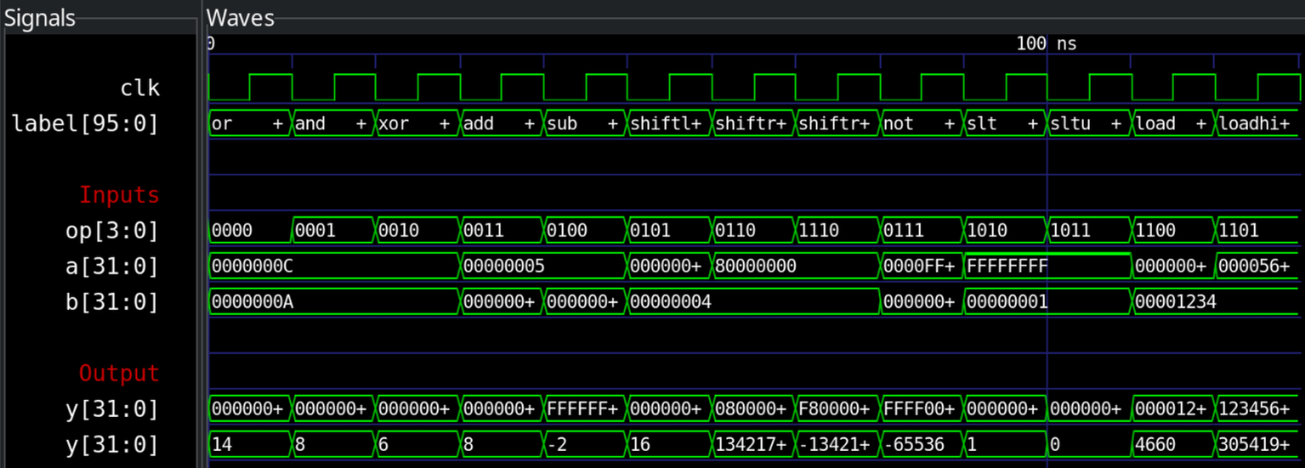
The label row shows the name of the operation that is being tested in that cycle (just for readability, internally there are no strings in the CPU of course!). In GTKWave you can choose how the signals are displayed, for example as hexadecimal, binary, or signed decimal numbers. Internally, the CPU only sees the binary values on the wires.
Note that the clk signal is not relevant here and is just for spacing the operations, as the ALU is purely combinational and produces its output immediately based on the current inputs.
Next steps
With the ALU done and tested, we can move on to the next CPU component. We have quite some components to go through before we can start seeing the full CPU in action.